



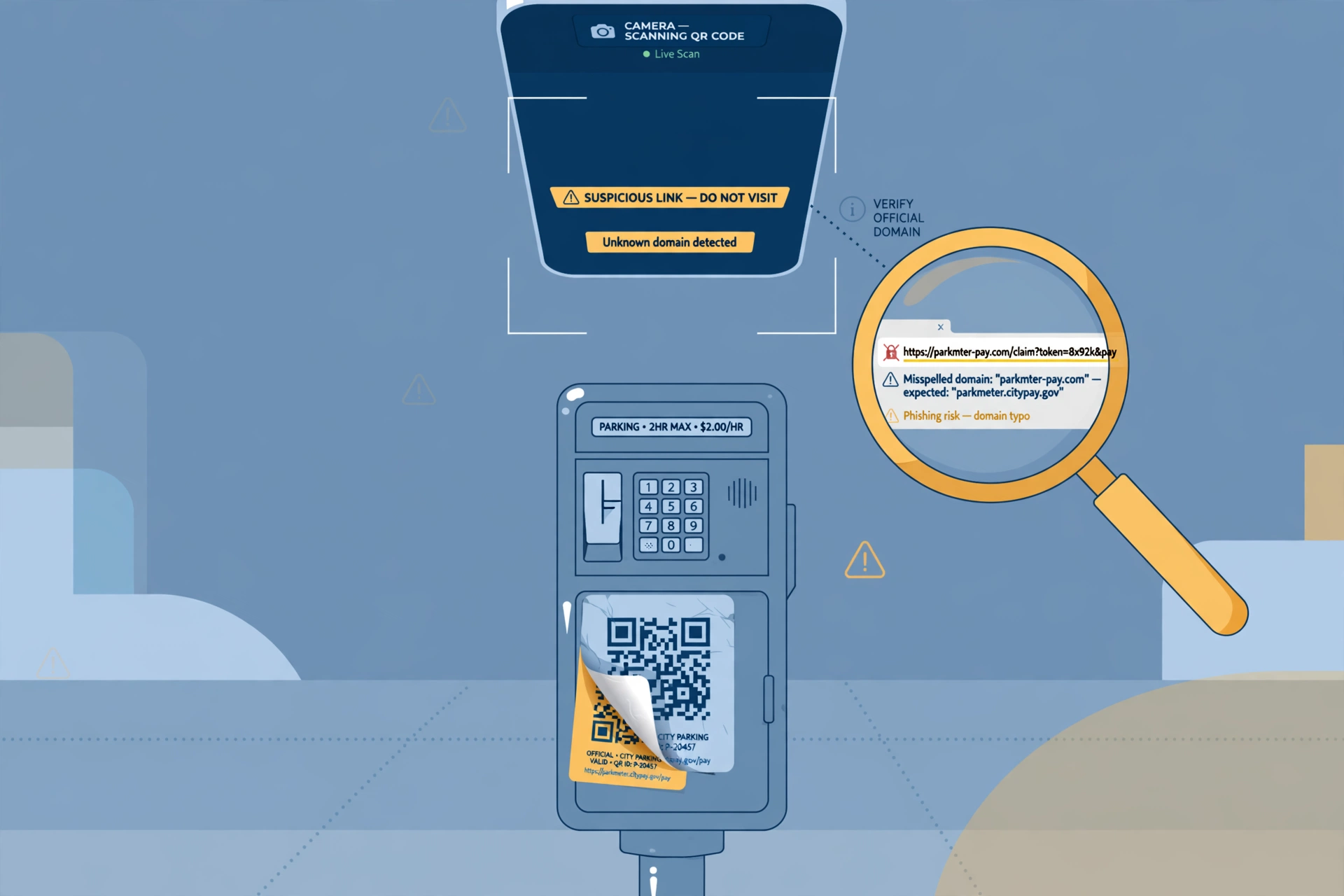
You’re standing in front of a parking meter, and it wants you to pay by scanning a QR code. It’s a small sticker, slightly crooked, and you’d never know if it’s the city’s code or someone else’s. That moment — a two-second decision you make without thinking — is exactly what a growing scam depends on.

QR code scams work because of a simple flaw in how we use them. When you hover over a normal link, your browser shows you the destination first. With a QR code, you have no idea where it goes until you’ve already scanned it. You’re placing your trust in a black-and-white square you can’t read, stuck somewhere anyone could have stuck it. Scammers have noticed.
What the scam actually looks like
There are two versions of it, and both are getting more common.
The first is physical. Scammers print their own QR codes as stickers and place them directly over legitimate ones — on parking meters, restaurant tables, anywhere the real code sits out in public. In early 2024, the FBI issued a public warning after finding that criminals were tampering with both digital and physical QR codes, swapping real ones for malicious copies. People have reported finding fake codes covering the real payment codes on parking meters, and there were cases in Texas cities where stickers sent drivers to a fraudulent parking payment site.
The second version arrives on your phone. You get a text or email containing a QR code and a made-up reason to scan it: a package couldn’t be delivered and you need to reschedule, there’s a problem with your account, suspicious activity was detected and you must change your password. The Federal Trade Commission says these are all stories designed to manufacture urgency, so you scan the code without pausing to think. Sometimes the QR code even arrives inside a package you never ordered — a twist on the old “brushing” scam — counting on the same curiosity.
Either way, the destination is the same. The code opens a spoofed website that looks like the real one, and anything you type into it — login, card details, address — goes to the scammer. Or the site tries to install malware on your phone. The FBI puts it plainly: scanning the wrong code can give a criminal access to your credentials and, through your accounts, your money.
Why QR codes are easy to weaponize
Here’s the part worth understanding, because it changes how you treat them. A URL in a text message can at least be read before you click. A QR code is unreadable to the human eye by design — it’s a machine-readable shortcut. You are delegating your trust to a pattern of squares.
That means the scammer doesn’t need to fool you with clever wording. They just need their sticker to be the one your camera sees. The physical fakes work best in exactly the places where you’re in a hurry — parking, checkout counters, event venues — because nobody stops to inspect a sticker when a meter is ticking. And the ones in messages work because a QR code feels official. It looks like something a company would send, which is precisely why a scammer sends it.
The 5-second check before you tap anything
Your phone’s camera already does most of the protective work — it shows you the link before you open it. Most camera QR scanners preview the URL as a tappable banner. Before you tap it, actually read it.
Look at the domain the way a proofreader would. Scammers register lookalike domains — one letter swapped, an extra hyphen, a “.net” where the real site is a “.com.” The FTC’s main piece of advice about QR codes is exactly this: inspect the URL before you open it, and watch for misspellings or switched letters. If the preview shows a short link or something you don’t recognize, don’t tap — type the company’s address yourself or open its official app.
Two more quick rules from the same playbook. If the site asks you to download an app, stop — never install an app from a QR code. Get it from your phone’s official app store instead, which the FBI specifically recommends. And if a QR code arrives in an email or text you weren’t expecting, especially one pushing you to act immediately, treat the urgency as the warning sign. Contact the company through a number or website you already know is real.
Red flags that the code itself isn’t real
Physical tampering usually leaves traces if you look. A sticker laid over another sticker, edges that lift or bubble, a QR code that looks newer or glossier than everything around it, a printed code where the official one used to be etched or engraved — any of these is worth a pause. If it’s a parking meter, compare the QR code with the city’s official payment app or the number printed on the meter. If the link goes somewhere different from the app you already have installed, trust the app.
For codes that arrive as messages, the red flags are behavioral: you weren’t expecting it, it demands immediate action, and scanning is presented as the only way to fix the problem. Real companies almost never send a random QR code as the sole path to resolving something urgent. A delivery company can be checked through its own website; a bank can be called. The scam needs you to skip those steps.
If you already scanned a bad one
First, don’t interact further. If you landed on a site that feels wrong, close it — the FTC advises against reaching out to whoever is on the other end, because they’ll try to extract money or more information from you.
If you typed in a username and password, change that password immediately, and change it everywhere else you used the same one. That part matters more than most people realize: scammers routinely try stolen credentials on other sites. Then check your bank and credit card statements for anything you didn’t authorize.
Keep your phone’s operating system and apps updated, which closes the holes malicious sites try to exploit. And report what happened — in the US, the FTC takes reports at ReportFraud.ftc.gov. One more uncomfortable truth, from the FBI: once money has been transferred to a scammer, law enforcement cannot guarantee it can be recovered. Speed matters. The faster you lock things down, the less there is to steal.
If credentials did leak, it helps to know what to do after your details have been exposed — the same response steps apply whether the leak came from a breach or a fake login page.
Make yourself a harder target
The long-term fix isn’t paranoia about every square barcode — it’s small habits that remove the decision under pressure.
For places you pay regularly, like parking or utility bills, bookmark the real website or use the official app, and never reach it through a scanned code. If a QR code is the only payment path offered somewhere and something feels off about it, ask. Staff at a restaurant or venue can usually confirm whether a table QR code is theirs in seconds.
Protect the accounts themselves, too. Strong, unique passwords and multi-factor authentication mean a stolen password alone isn’t enough to get into your accounts. And a general rule that covers most scam flavors: never scan a QR code from an email, text, or package you weren’t expecting. Your curiosity is the product being sold.
QR codes aren’t going anywhere — they’re too convenient. The scam works precisely because that convenience trained us not to think. Five seconds of reading the URL, and the habit of reaching companies through channels you trust, is all it takes to keep the convenience without paying for it. More everyday protection like this lives in our Online Safety section.













Comments 2