


• About
  • Contact
  • Privacy Policy
  • Terms & Conditions
  • Disclaimer
  • Cookie Policy
Superdova.com
Advertisement
  • AI Tools
  • Internet Guides
  • Tech How-To
  • Apps & Software
  • Online Safety
No Result
View All Result
  • AI Tools
  • Internet Guides
  • Tech How-To
  • Apps & Software
  • Online Safety
No Result
View All Result
Superdova.com
No Result
View All Result
Home Internet Guides

That Message You Deleted on WhatsApp? The Other Person Might Still Have It

Amit by Amit
October 1, 2026
in Internet Guides
0
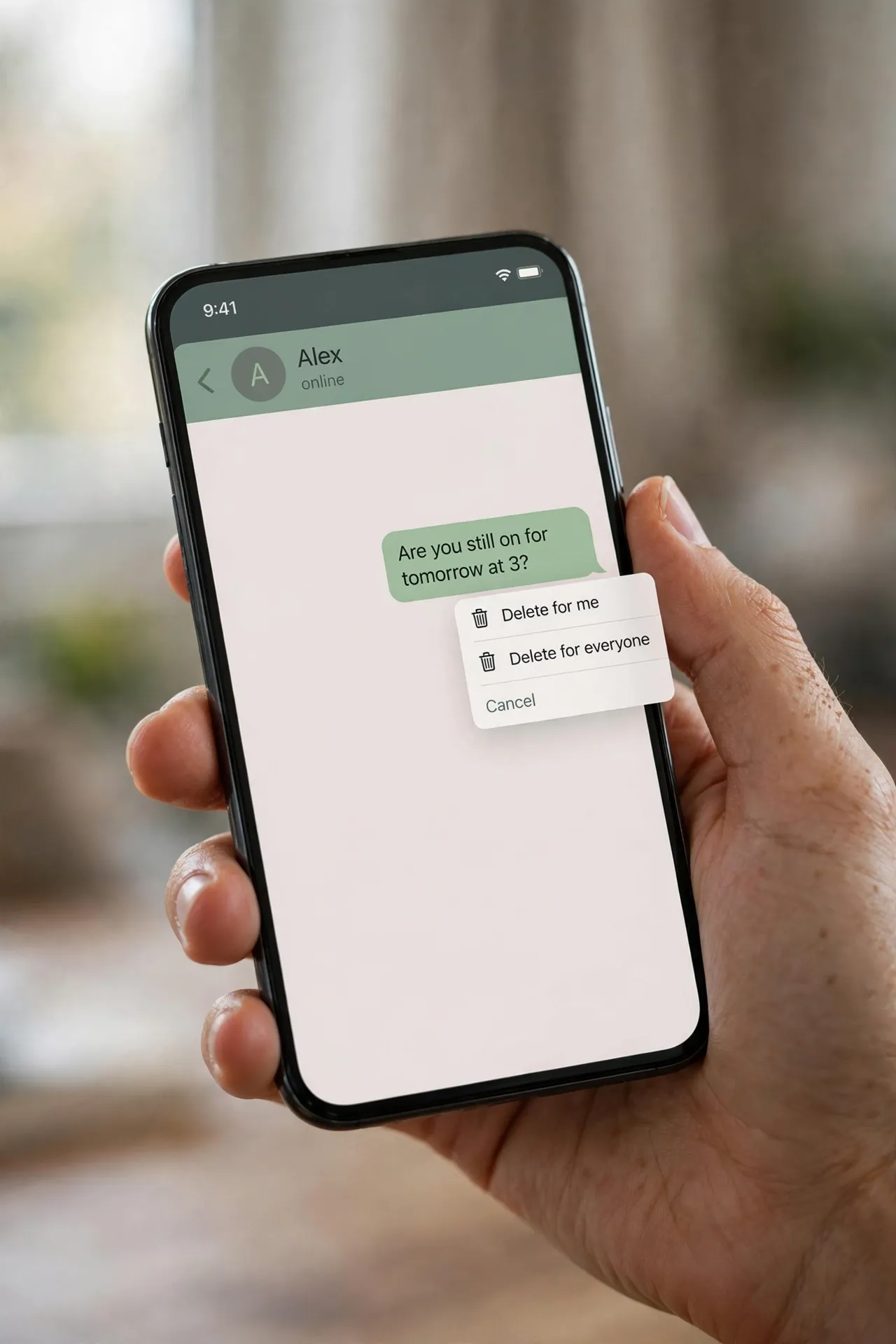
A hand holding a smartphone showing a messaging chat with a message bubble and a pop-up menu offering "Delete for me" and "Delete for everyone"
0
SHARES
1
VIEWS
Share on FacebookShare on Twitter

You sent the message to the wrong chat. Or the typo changed the meaning entirely. Your thumb finds the message, presses and holds, and up comes the menu: Delete. Delete for everyone. A heartbeat later, the message is gone — or rather, replaced by “You deleted this message”. Relief. But is it actually gone? Mostly, yes. But not as completely as the menu makes it feel. Here’s what really happens.

Table of Contents

Toggle
  • Two deletes that do very different things
  • You’ve got about 60 hours — then the option disappears
  • What deletion can’t undo
  • A group admin can delete your message too
  • If prevention beats the delete button

Two deletes that do very different things

The delete menu offers two options, and mixing them up is the most common mistake people make. Delete for me removes the message from your own phone only. It’s a tidy-up tool. The recipient still has the message, will still read it, and will probably still reply to it.

Delete for everyone is the one people actually want: it sends a signal to remove the message from every chat it was delivered to — individual and group. To use it, press and hold the message, tap Delete, then choose Delete for everyone. You can select several messages at once and delete them all the same way. After it works, the message is replaced by the line “This message was deleted” in the recipient’s chat.

You’ve got about 60 hours — then the option disappears

This isn’t something you can do whenever you feel like it. When WhatsApp introduced the feature in 2017, the window was a stingy seven minutes. It grew to about an hour in 2018, and in 2022 WhatsApp extended it to 2 days and 12 hours — 60 hours from the moment you hit send. That window is still the rule today.

Once those 60 hours pass, the “Delete for everyone” option simply stops appearing in the menu. There’s no override, no settings trick, and no support ticket that will bring it back. A couple of practical caveats from WhatsApp’s own help pages: for the deletion to reach the other side, both phones should be running a recent version of WhatsApp, and if the deletion fails on their end, WhatsApp won’t tell you it failed. So the delete you saw succeed is only confirmed as gone on your own phone.

What deletion can’t undo

Even when the delete works perfectly, there are copies of your message that no button can touch:

They’ve already seen it. The obvious one. If the message was delivered and opened before you deleted it, deletion changes nothing — the words are in their head. Double-check marks are the clue: two grey ticks means delivered, two blue ticks means read.

Screenshots. Anyone can screenshot any message at any time, and there’s no way to know it happened. A message that lived for thirty seconds before deletion can live forever as a photo.

Notifications. When a message arrives, its text often shows up in a push notification on the recipient’s lock screen or notification shade. Deleting the message doesn’t clear those notifications. The chat says “This message was deleted”; the lock screen may still be quoting it.

Photos and videos saved to the gallery. WhatsApp saves incoming media to the phone’s camera roll if media visibility is on (and it’s on by default). Deleting the message from the chat does not delete the photo from their gallery. The message vanishes; the file stays.

The copies you never think about. A chat backup made before you deleted the message keeps a copy — backups capture the chat as it was at the time. And if the message was forwarded, every forwarded copy is now independent of yours; deleting your original does nothing to the copies floating around in other chats.

A group admin can delete your message too

One more wrinkle worth knowing: in group chats, an admin can delete anyone’s message for everyone, not just their own. WhatsApp rolled this out in 2022, and when it happens, the group sees a line along the lines of “This was deleted by an admin”. It follows the same rules as your own deletions — the copies described above survive — but it’s worth remembering before sending something inflammatory to a group where you aren’t the admin.

If prevention beats the delete button

If you often find yourself wishing a message would vanish, there’s a tool that removes the panic entirely: disappearing messages. Open a chat, tap the contact or group name, and you’ll find the option under “Disappearing messages”. You can set new messages to vanish after 24 hours, 7 days, or 90 days. Everything sent after you switch it on deletes itself on schedule, from everyone’s phones.

It’s not a cloak of invisibility — screenshots and forwards still work, and someone can quote a message before it disappears — but it turns deletion from an emergency action into the default. For chats that are mostly coordination, planning, or casual chatter, it’s the closest WhatsApp gets to “it was never there”.

The honest way to think about “Delete for everyone” is that it deletes the message from the chat, not from the world. Within the 60-hour window, it’s genuinely useful for fixing a message sent to the wrong person or scrubbing a typo. Just don’t treat it as a time machine — once words have travelled to another phone, a lock screen, a gallery, or a backup, they’re out of your hands.


Previous Post

Your AI Chats Are Probably Training Tomorrow’s Models. Four Settings Worth Checking

Next Post

The Wi-Fi Password You Need Is Already Saved on Your Device

Amit

Amit

Next Post
Illustration of a smartphone and laptop on a desk with a glowing Wi-Fi symbol and a key badge floating above them, connected by dotted lines.

The Wi-Fi Password You Need Is Already Saved on Your Device

Leave a Reply Cancel reply

Your email address will not be published. Required fields are marked *

Stay Connected test

  • 24k Followers
  • 99 Subscribers
  • Trending
  • Comments
  • Latest
Photorealistic illustration of a laptop displaying an email inbox with a breach warning, with a cracked red padlock floating above the screen

Your Email Was in a Data Breach? Don’t Panic — Do These Five Things

September 23, 2026
Illustration of a laptop showing ChatGPT's settings panel with the Custom instructions field highlighted

What to Put in ChatGPT’s Custom Instructions (With Examples Worth Copying)

September 22, 2026
Illustration of a golden master key hovering over a glowing inbox icon on a laptop screen, surrounded by shields and padlocks

If Someone Gets Into Your Email, They Get Into Everything

September 22, 2026
Illustration of a smartphone showing an AI chat conversation with a magnifying glass examining the answers, symbolising fact-checking

AI Chatbots Sound Confident Even When They’re Wrong. Here’s How to Check Their Answers

September 23, 2026
Illustration of a smartphone showing an AI chat conversation with a magnifying glass examining the answers, symbolising fact-checking

AI Chatbots Sound Confident Even When They’re Wrong. Here’s How to Check Their Answers

9
Illustration of a golden master key hovering over a glowing inbox icon on a laptop screen, surrounded by shields and padlocks

If Someone Gets Into Your Email, They Get Into Everything

8
Photorealistic illustration of a laptop displaying an email inbox with a breach warning, with a cracked red padlock floating above the screen

Your Email Was in a Data Breach? Don’t Panic — Do These Five Things

6
A home Wi-Fi router sending a glowing wireless signal toward a laptop on a couch, with a data cable running into the wall — illustrating the difference between Wi-Fi speed and internet speed

Your Wi-Fi Speed and Your Internet Speed Are Not the Same Thing

5
A hand holding a smartphone showing a chat screen with the word "online" under a contact's name

Your WhatsApp “Online” Status Isn’t as Private as You Think

October 20, 2026
Flat illustration of a laptop showing a logout symbol with a small brass key beside it, on a blue and grey background

Signed Out Again? Why Websites Keep Logging You Out

October 20, 2026
Woman with earbuds relaxing in an armchair while her phone reads an article aloud, tea on a side table, warm evening light

Too Tired to Read? Your Phone Can Read the Screen for You

October 19, 2026
Photograph of a smartphone lying on a wooden café table, its screen showing a map with a glowing blue location pin, a hand reaching toward it in the background

Lost Your Phone? Ring It, Lock It, or Find It From Any Computer

October 19, 2026

Recent News

A hand holding a smartphone showing a chat screen with the word "online" under a contact's name

Your WhatsApp “Online” Status Isn’t as Private as You Think

October 20, 2026
Flat illustration of a laptop showing a logout symbol with a small brass key beside it, on a blue and grey background

Signed Out Again? Why Websites Keep Logging You Out

October 20, 2026
Woman with earbuds relaxing in an armchair while her phone reads an article aloud, tea on a side table, warm evening light

Too Tired to Read? Your Phone Can Read the Screen for You

October 19, 2026
Photograph of a smartphone lying on a wooden café table, its screen showing a map with a glowing blue location pin, a hand reaching toward it in the background

Lost Your Phone? Ring It, Lock It, or Find It From Any Computer

October 19, 2026
Superdova.com

SuperDova is an independent technology publication covering AI tools, software, internet guides, digital skills and online safety. Our goal is to make technology easier to understand and use.

Follow Us

Browse by Category

  • AI Tools
  • Apps & Software
  • Internet Guides
  • Online Safety
  • Tech How-To

Recent News

A hand holding a smartphone showing a chat screen with the word "online" under a contact's name

Your WhatsApp “Online” Status Isn’t as Private as You Think

October 20, 2026
Flat illustration of a laptop showing a logout symbol with a small brass key beside it, on a blue and grey background

Signed Out Again? Why Websites Keep Logging You Out

October 20, 2026
  • About
  • Contact
  • Privacy Policy
  • Terms & Conditions
  • Disclaimer
  • Cookie Policy

© 2026 SuperDova — Technology, AI & Digital Guides. All Rights Reserved.

No Result
View All Result
  • AI Tools
  • Internet Guides
  • Tech How-To
  • Apps & Software
  • Online Safety

© 2026 SuperDova — Technology, AI & Digital Guides. All Rights Reserved.









