


• About
  • Contact
  • Privacy Policy
  • Terms & Conditions
  • Disclaimer
  • Cookie Policy
Superdova.com
Advertisement
  • AI Tools
  • Internet Guides
  • Tech How-To
  • Apps & Software
  • Online Safety
No Result
View All Result
  • AI Tools
  • Internet Guides
  • Tech How-To
  • Apps & Software
  • Online Safety
No Result
View All Result
Superdova.com
No Result
View All Result
Home Online Safety

Your Bank Will Never Call and Ask for Your OTP

Amit by Amit
September 23, 2026
in Online Safety
0
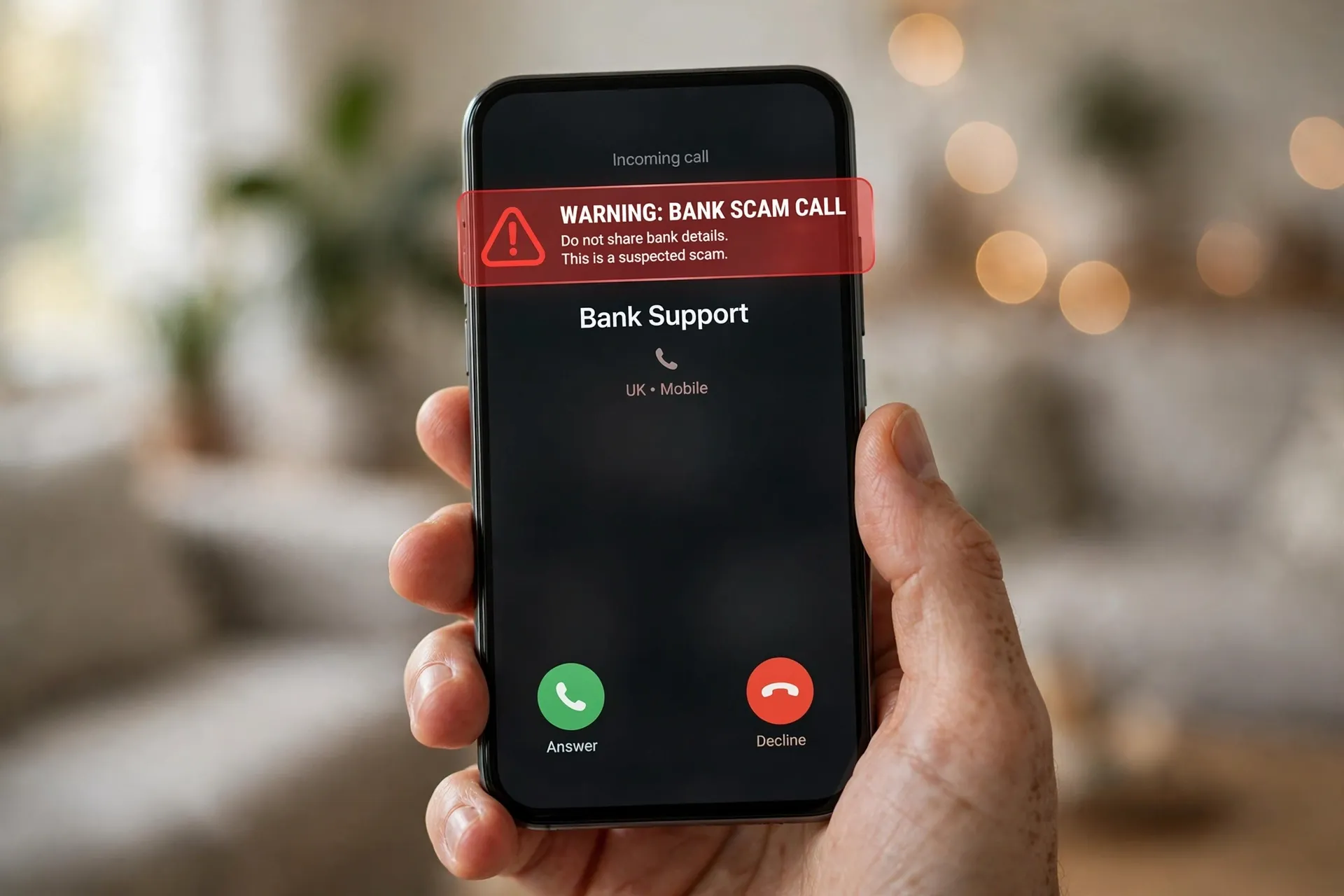
Hand holding a smartphone showing an incoming call labeled Bank Support with a red warning overlay that reads "Warning: Bank Scam Call — Do not share bank details"
0
SHARES
2
VIEWS
Share on FacebookShare on Twitter

The call usually comes on an ordinary afternoon. The voice on the line sounds professional and calm. “Hello, I’m calling from your bank’s fraud department. We’ve spotted a suspicious transaction on your account, and I need to verify your identity to block it. A code has just been sent to your phone — please read it out to me.”

Everything about the call feels legitimate. The caller says your name. They know which bank you use. There is even a six-digit code arriving on your phone right now, exactly as they said there would be. And that is precisely what makes this one of the most effective scams going.

So here is the rule that ends every one of these calls, no matter how convincing the voice sounds: your bank will never call and ask for your OTP, PIN, or CVV. Never on the phone, never by text, never by email.

Table of Contents

Toggle
  • Why scammers ask for the code
  • How they sound so convincing
  • The warning signs that give it away
  • What to do when you’re on the call
  • Already shared the code? Move fast
  • The habit worth keeping

Why scammers ask for the code

Understanding the trick is the fastest way to become immune to it. When the “fraud department” calls you, they are not asking for your OTP just to have it. They are mid-way through an attack.

While you are on the phone, the scammer is sitting in front of your bank’s login page or payment screen, typing in your account number — which they already have, often from a previous data breach or leak. When the bank’s system sends the one-time passcode to your phone as a security check, the scammer asks you to read it out. The moment you do, they type it in, and they are in.

That is why the code arrives exactly when they said it would. It feels like proof they are from the bank. It is actually proof that someone is trying to log into your account right now, and the only thing standing between them and your money is that code on your screen.

How they sound so convincing

Modern bank scams are polished operations, not the clumsy cold calls of a decade ago. A few things worth knowing:

The caller ID can lie. It is easy to make a phone display your bank’s real number or a name like “Bank Support.” If a number looks official, treat that as decoration, not proof. The phone screen tells you nothing about who is actually calling.

They often know your name and your bank. This startles people the most. But names, phone numbers, and banking relationships circulate freely in leaked databases and bought contact lists. If your details have ever appeared in a data breach — which, realistically, many people’s have (here’s what to do when that happens) — a scammer can greet you by name and name your bank before you say a word.

They never sound like criminals. There are no threats shouted down the line, no broken English, no background noise from a boiler room. The whole routine is designed to sound like a routine security check, because the calmer you feel, the more likely you are to cooperate.

The warning signs that give it away

Even a smooth operation leaves fingerprints. Watch for any of these:

  • Urgency. “We need to do this right now or the transaction will go through.” Real banks don’t threaten you with instant consequences if you don’t act this second.
  • Asking for anything secret. OTPs, PINs, CVVs, passwords, “the first four digits of your PIN,” screen-sharing your phone — any request for something only you should know is the line no real bank crosses.
  • Telling you not to tell anyone. “This is a confidential investigation — please don’t hang up.” This is the scammer keeping you on the line so you don’t check with anyone else.
  • Asking you to move money to a “safe account.” Banks never ask you to transfer funds to a new account for safety. Any version of this is fraud, full stop.
  • Asking you to call them back on their number. Even “calling back” is unsafe if you dial the number they gave you. Only use a number you find yourself — on your card, in the official app, or on the bank’s real website.

What to do when you’re on the call

The instructions are mercifully short: hang up. You don’t owe the caller an explanation, a polite goodbye, or even the thirty seconds it takes to check whether they’re real. Nobody legitimate will ever punish you for hanging up and calling back through the official channel.

Then, if you are genuinely worried something is wrong with your account, look up your bank’s number yourself — the number printed on your card, inside the official mobile app, or on the bank’s own website that you navigate to directly — and call them. If there really is suspicious activity, you will find out from the actual bank, on a call you initiated.

Never use a number, link, or callback option that came from the unsolicited message itself. That is the single most reliable habit you can build: the person who contacts you sets the terms; you set the channel.

Already shared the code? Move fast

If you read out an OTP or shared a PIN before realising what was happening, don’t freeze up — speed is your best defence now. Call your bank immediately on the number on your card and tell them you may have been scammed. They can lock the card, freeze the session, and walk you through reversing unauthorised activity.

Then check your account for transactions you didn’t make, and change your online banking password. If that password was the same one you use for your email, fix that too — your email account is the master key to everything else, and a leaked banking password is not something to leave floating around.

Consider reporting the attempt as well. Most banks have a fraud-reporting channel, and national reporting portals exist for exactly this. Reports help investigators track patterns, and they cost you about five minutes.

The habit worth keeping

Memorise this as a reflex rather than a rule you have to think about: any unexpected call that wants your codes, passwords, or card details is a scam. You don’t need to identify which scam, or win an argument with the caller, or feel embarrassed about falling for the first half of it. Hang up, call your bank yourself, and carry on with your day. The scammers are counting on the call being too convincing for that — prove them wrong.


Previous Post

The App Permissions on Your Phone Worth Reviewing Today

Next Post

Chatbot or Search Engine? How to Pick the Right One for What You’re Doing

Amit

Amit

Next Post
Illustration of a laptop showing a search engine results page on one half of the screen and an AI chatbot conversation on the other half

Chatbot or Search Engine? How to Pick the Right One for What You're Doing

Leave a Reply Cancel reply

Your email address will not be published. Required fields are marked *

Stay Connected test

  • 24k Followers
  • 99 Subscribers
  • Trending
  • Comments
  • Latest
Photorealistic illustration of a laptop displaying an email inbox with a breach warning, with a cracked red padlock floating above the screen

Your Email Was in a Data Breach? Don’t Panic — Do These Five Things

September 23, 2026
Illustration of a laptop showing ChatGPT's settings panel with the Custom instructions field highlighted

What to Put in ChatGPT’s Custom Instructions (With Examples Worth Copying)

September 22, 2026
Illustration of a golden master key hovering over a glowing inbox icon on a laptop screen, surrounded by shields and padlocks

If Someone Gets Into Your Email, They Get Into Everything

September 22, 2026
Illustration of a smartphone showing an AI chat conversation with a magnifying glass examining the answers, symbolising fact-checking

AI Chatbots Sound Confident Even When They’re Wrong. Here’s How to Check Their Answers

September 23, 2026
Illustration of a smartphone showing an AI chat conversation with a magnifying glass examining the answers, symbolising fact-checking

AI Chatbots Sound Confident Even When They’re Wrong. Here’s How to Check Their Answers

9
Illustration of a golden master key hovering over a glowing inbox icon on a laptop screen, surrounded by shields and padlocks

If Someone Gets Into Your Email, They Get Into Everything

8
Photorealistic illustration of a laptop displaying an email inbox with a breach warning, with a cracked red padlock floating above the screen

Your Email Was in a Data Breach? Don’t Panic — Do These Five Things

6
A home Wi-Fi router sending a glowing wireless signal toward a laptop on a couch, with a data cable running into the wall — illustrating the difference between Wi-Fi speed and internet speed

Your Wi-Fi Speed and Your Internet Speed Are Not the Same Thing

5
A hand holding a smartphone showing a chat screen with the word "online" under a contact's name

Your WhatsApp “Online” Status Isn’t as Private as You Think

October 20, 2026
Flat illustration of a laptop showing a logout symbol with a small brass key beside it, on a blue and grey background

Signed Out Again? Why Websites Keep Logging You Out

October 20, 2026
Woman with earbuds relaxing in an armchair while her phone reads an article aloud, tea on a side table, warm evening light

Too Tired to Read? Your Phone Can Read the Screen for You

October 19, 2026
Photograph of a smartphone lying on a wooden café table, its screen showing a map with a glowing blue location pin, a hand reaching toward it in the background

Lost Your Phone? Ring It, Lock It, or Find It From Any Computer

October 19, 2026

Recent News

A hand holding a smartphone showing a chat screen with the word "online" under a contact's name

Your WhatsApp “Online” Status Isn’t as Private as You Think

October 20, 2026
Flat illustration of a laptop showing a logout symbol with a small brass key beside it, on a blue and grey background

Signed Out Again? Why Websites Keep Logging You Out

October 20, 2026
Woman with earbuds relaxing in an armchair while her phone reads an article aloud, tea on a side table, warm evening light

Too Tired to Read? Your Phone Can Read the Screen for You

October 19, 2026
Photograph of a smartphone lying on a wooden café table, its screen showing a map with a glowing blue location pin, a hand reaching toward it in the background

Lost Your Phone? Ring It, Lock It, or Find It From Any Computer

October 19, 2026
Superdova.com

SuperDova is an independent technology publication covering AI tools, software, internet guides, digital skills and online safety. Our goal is to make technology easier to understand and use.

Follow Us

Browse by Category

  • AI Tools
  • Apps & Software
  • Internet Guides
  • Online Safety
  • Tech How-To

Recent News

A hand holding a smartphone showing a chat screen with the word "online" under a contact's name

Your WhatsApp “Online” Status Isn’t as Private as You Think

October 20, 2026
Flat illustration of a laptop showing a logout symbol with a small brass key beside it, on a blue and grey background

Signed Out Again? Why Websites Keep Logging You Out

October 20, 2026
  • About
  • Contact
  • Privacy Policy
  • Terms & Conditions
  • Disclaimer
  • Cookie Policy

© 2026 SuperDova — Technology, AI & Digital Guides. All Rights Reserved.

No Result
View All Result
  • AI Tools
  • Internet Guides
  • Tech How-To
  • Apps & Software
  • Online Safety

© 2026 SuperDova — Technology, AI & Digital Guides. All Rights Reserved.









