



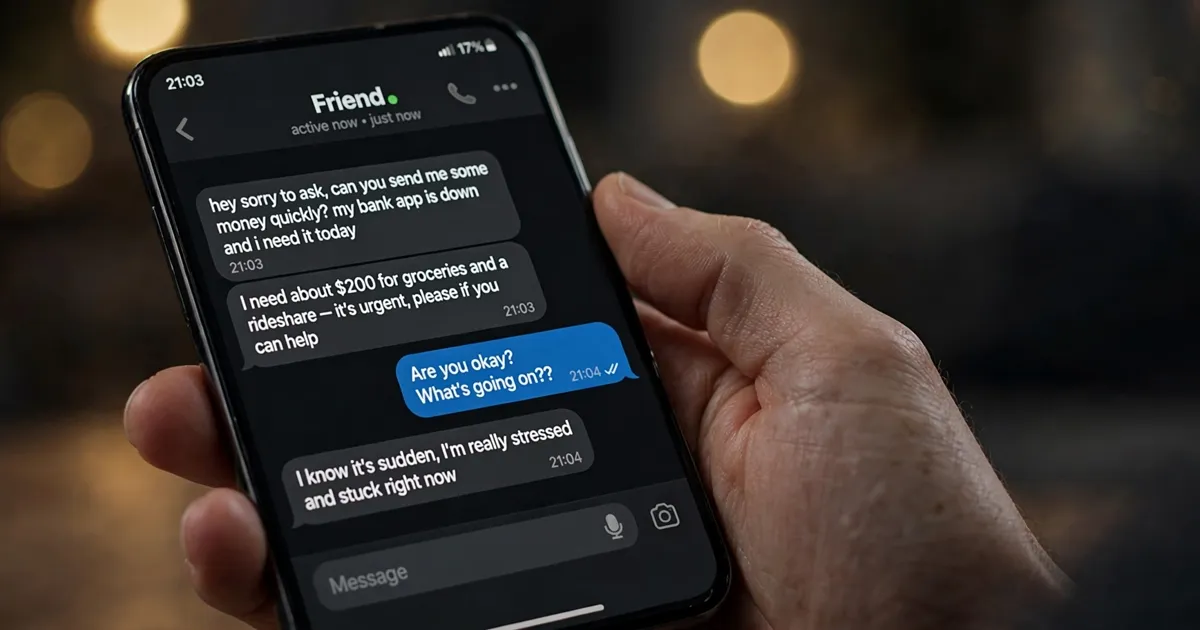
The message lands at an ordinary hour, from an account you know well — an old friend, a cousin, someone from the group chat.

“hey sorry to ask, can you send me some money quickly? my bank app is down and i need it today”
There’s an emergency story, a little pressure, and the awkward feeling that saying no makes you a bad friend. So before you do anything at all, stop. Your friend isn’t asking for money. Someone who took over their account is.
This scam doesn’t bother pretending to be a stranger
Most scams start from nowhere — an unknown number, a suspicious email, a stranger’s profile. This one starts from inside your own contact list, and that is exactly why it works. When a fraudster gains control of a real account, they inherit everything attached to it: the profile photo, the years of chat history, the trust.
According to Action Fraud, the UK’s national fraud reporting centre, roughly half of the account-takeover reports it receives fall into two patterns — and the most common one begins with the attacker already sitting inside a friend’s account, messaging that person’s contacts as if they were them. The victim has no idea the account is compromised, so every reply is written to the “friend” — and every hesitation is worn down by the relationship.
The two plays scammers run from your friend’s account
Once inside, the scammer almost always runs one of two plays.
The money ask. There’s a sudden emergency — a stranded trip, a medical bill, a locked bank app — and they need money right now. The requested payment method is the giveaway: gift cards, a wire transfer, cryptocurrency, or a payment app your friend has never used with you before. The FTC lists pressure to act immediately, plus payment by gift card, wire transfer, crypto, or payment app, among the classic red flags of a scam. Real emergencies don’t require gift cards.
The favour that takes your account next. The other play is sneakier, and Action Fraud specifically warns about it: the “friend” asks you to vote in a competition, help “secure” their account, or claims they accidentally sent a code to your phone and asks you to send it back — sometimes with a screenshot of a link. That code is almost certainly an account login or recovery code. Sharing it doesn’t help your friend; it hands the scammer the keys to your account, so they can run the same trick on everyone you know. It’s a chain, and each victim becomes the next bait.
How to tell it’s not really them
The messages will be almost right, but not quite. Watch for these:
- The request is completely out of character — your friend has never asked for money before, or never sends messages written like this.
- The tone is urgent and vaguely off — lowercase, oddly generic, missing the jokes and nicknames your friend actually uses.
- They steer you away from verification. “My phone’s dead, just stay on chat here.” A scammer inside the chat will answer a call placed through the same chat — that’s exactly why they suggest it.
- The payment method is something your friend would never use.
- They ask for a code, a screenshot, or for you to click a link and change a setting on your account. A real friend never needs your login code.
The same urgency playbook shows up in other forms too — including AI voice-cloning scam calls that impersonate a grandchild in trouble. The voice or the face may be new, but the trick is old: make you feel rushed, make you stop thinking.
What to do when the message arrives
First, don’t send money, don’t share codes, and don’t click links — even out of curiosity. Then verify through a different channel entirely. Call your friend on their actual phone number, not through the app where the message arrived. A two-minute voice call clears it up instantly: either your friend really does need help, or they had no idea someone was messaging in their name.
If you can’t reach them, tell them through another app — or reach a mutual friend who can pass it on. Meanwhile, report the messages to the platform. On Facebook or Instagram, a reported conversation from a compromised account helps the platform lock it down faster.
If you did send money, contact your bank immediately — the sooner they know, the better the chance of stopping the transfer. Then report the fraud: ReportFraud.ftc.gov in the US, or Action Fraud online or on 0300 123 2040 in the UK. Reporting matters even when the money is gone; it’s how patterns get flagged before they hit the next friend.
If the hacked account is yours
Sometimes the roles reverse and the messages are coming from your account. You’ll find out when a confused friend calls, or when you notice messages you never sent. Act from a device you trust: change the password, check the recovery email address hasn’t been swapped to the attacker’s, review and end active sessions on devices you don’t recognise, and turn on two-step verification if it wasn’t on. Then tell your friends — a quick post or message saying your account was compromised stops the chain from continuing through them.
There’s a fuller step-by-step walkthrough here: Your Account Was Hacked? Don’t Stop at Changing the Password.
Make your account the one scammers skip
Attackers get into accounts the boring way: reused passwords, weak passwords, phishing links, and — most often — no two-step verification. Action Fraud’s own advice on the subject is blunt about this: strong, different passwords for your email and social accounts, plus that extra layer of two-step verification, close off most of the routes in.
A few habits that genuinely raise the bar: use an authenticator app rather than SMS codes where the option exists, keep your recovery email address current, and periodically review which third-party apps have access to your accounts — closing old accounts you no longer use shrinks the surface too.
And remember the habit that beats all of this: whenever a message from someone you know involves money, codes, or urgency, trust the friendship — and verify the request. The thirty seconds it takes to call your friend is the entire scam, defused.












