


• About
  • Contact
  • Privacy Policy
  • Terms & Conditions
  • Disclaimer
  • Cookie Policy
Superdova.com
Advertisement
  • AI Tools
  • Internet Guides
  • Tech How-To
  • Apps & Software
  • Online Safety
No Result
View All Result
  • AI Tools
  • Internet Guides
  • Tech How-To
  • Apps & Software
  • Online Safety
No Result
View All Result
Superdova.com
No Result
View All Result
Home Online Safety

That ‘Hi Mum’ Text Is a Scam

Amit by Amit
September 24, 2026
in Online Safety
1
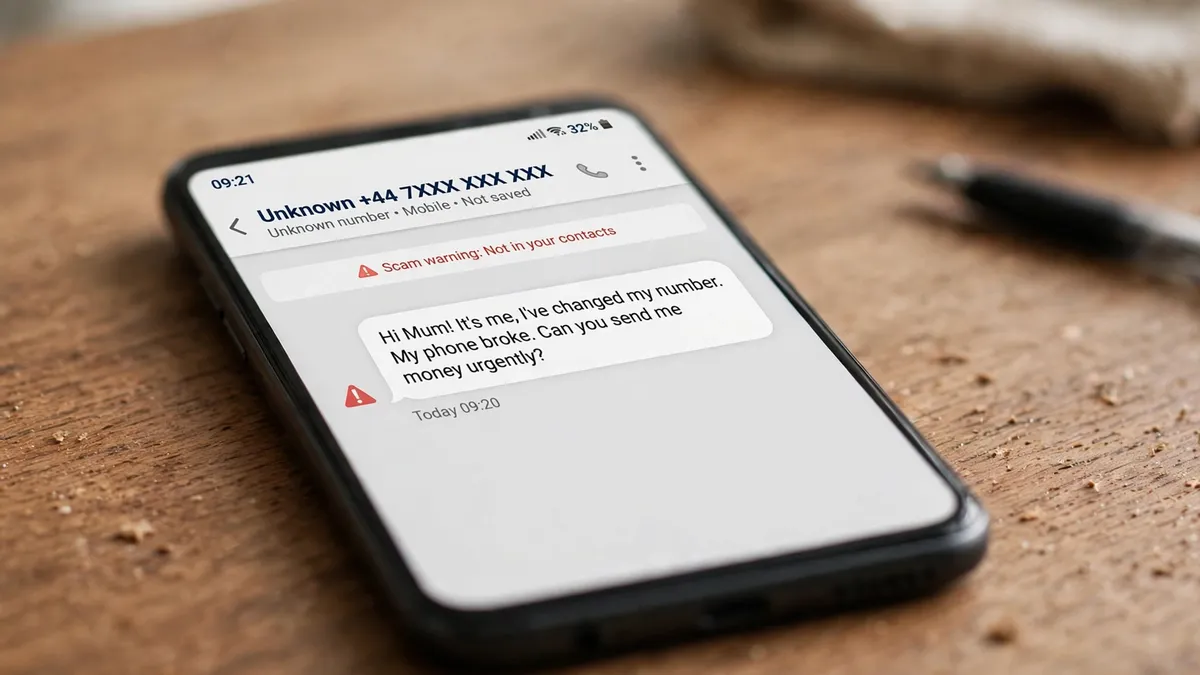
Photorealistic image of a smartphone on a wooden desk showing a messaging app with a suspicious "Hi Mum! It's me, I've changed my number" text from an unknown number, with a red warning triangle beside the message
0
SHARES
3
VIEWS
Share on FacebookShare on Twitter

“Hi Mum. It’s me. I’ve changed my number — my phone broke. Can you send me £1,200? It’s urgent.”

If that message ever lands on your phone from an unknown number, everything in you will want to help. That’s exactly the point. It isn’t your child. It’s a scam — one of the most successful message-based scams running, and one that has already cost victims over £1.5 million, according to the UK’s national fraud reporting centre, Action Fraud.

The police call it the “friend in need” scam. Understanding how it works is the only vaccine you need, because the entire trick runs on a script — and scripts have patterns.

Table of Contents

Toggle
  • The script, word for word
  • Why even careful people fall for it
  • The giveaways, if you know where to look
  • Watch out for the second scam hiding behind the first
  • What to do if the message arrives

The script, word for word

It almost always starts with “Hello Mum” or “Hello Dad”, sent from a number you don’t recognise. The sender claims to be your son or daughter, texting from a new number because their phone was lost or damaged. Then comes the ask: they need money urgently, either to buy a replacement phone or to pay a bill.

Once you agree, the “child” sends you bank details. That’s the part most people miss — you’re not sending money to your kid’s account. You’re sending it to a stranger’s. And some scammers don’t stop at one payment: Action Fraud warns that criminals often come back with further demands until the victim realises what’s happened.

When the City of London Police issued its warning, Action Fraud had logged 1,235 reports of this scam in a few months, with total losses topping £1.5 million. The warnings haven’t stopped since — National Trading Standards and WhatsApp itself have backed a “Stop. Think. Call.” awareness campaign against exactly these message-based scams, and police say they remain one of the cruellest because they exploit the emotional vulnerability of the public.

Why even careful people fall for it

This scam doesn’t work by being clever. It works by being fast. The message creates urgency — a bill, a broken phone, a child who needs help right now — because urgency switches off the part of your brain that checks things. As Detective Chief Inspector Craig Mullish of the City of London Police put it: “Taking a moment to stop and think before parting with your money or information could keep you safe.”

It also exploits something good about you: your willingness to help family. Louise Baxter of the National Trading Standards scams team has described these messages as particularly cruel for precisely that reason — they prey on kindness. Nobody falls for this scam because they’re gullible. They fall for it because they care.

The giveaways, if you know where to look

The message will try to keep you inside the chat. That’s your first clue. The scammer will avoid voice calls and video calls, because a real voice would give the game away. So make this your house rule: a request for money from a new number gets a voice check — a call to their old number, or a voice note. Scammers can fake a lot of things. A live conversation with your actual child isn’t one of them.

The second clue is the payment itself. Read the bank details you’re given. Is the account in your child’s name? A genuine child paying a bill asks you to send money to them; a scammer hands you details that lead somewhere else entirely. And the third clue is the urgency. Real family emergencies survive a five-minute phone call. Scams often don’t.

Watch out for the second scam hiding behind the first

There’s a related trick you should know about, because it comes from people pretending to be someone you trust. You get a friendly message — seemingly from a friend or a group member — around the same time WhatsApp sends you a six-digit registration code by text. The “friend” claims they sent you their code by accident and asks you to forward it to them.

That code is yours, and it lets whoever has it take over your WhatsApp account and lock you out. The rule is absolute: never share a WhatsApp registration code with anyone, ever. And switch on two-step verification so this trick fails even if someone gets their hands on your code — go to Settings, then Account, then Two-step verification, tap Enable, and choose a six-digit PIN plus a recovery email address you can access. From then on, anyone trying to register your number on another phone needs your PIN as well as the code.

What to do if the message arrives

Stop. Think. Call. That’s the official advice, and it’s genuinely all you need. Stop — take a breath before you respond, no matter how urgent the message sounds. Think — does this request make sense? Call — ring your child on the number you already have saved, not the new one. If you can’t reach them, ask the new number for a voice note.

Don’t delete the chat. You can report and block the sender inside WhatsApp by pressing and holding the message bubble and choosing Report — WhatsApp reviews reports like these to shut the accounts down. You can also report it to Action Fraud at actionfraud.police.uk or on 0300 123 2040.

And if you already sent money: call your bank immediately — in the UK, dialling 159 connects you to most major banks’ fraud teams. Then report it to Action Fraud. Speed matters here, because the sooner a payment is flagged, the better the chance of stopping it.

The next time a stranger texts you “Hi Mum”, you’ll know exactly what to do. The whole scam depends on the message arriving before the knowledge does — and now it won’t. For more on keeping your accounts safe, browse the rest of our Online Safety articles; your email in particular deserves attention, because it’s the master key to your online life and every recovery code in this story lands there.


Previous Post

Why Does Every App Ask You to Sign In?

Next Post

Before You Ask, Give Your AI Chatbot Something to Read

Amit

Amit

Next Post
Illustration of a hand placing a PDF document into a friendly AI chatbot chat window on a laptop screen

Before You Ask, Give Your AI Chatbot Something to Read

Comments 1

  1. Pingback: Voice-Clone Scam Calls: The Family Code Word That Stops Them

Leave a Reply Cancel reply

Your email address will not be published. Required fields are marked *

Stay Connected test

  • 24k Followers
  • 99 Subscribers
  • Trending
  • Comments
  • Latest
Photorealistic illustration of a laptop displaying an email inbox with a breach warning, with a cracked red padlock floating above the screen

Your Email Was in a Data Breach? Don’t Panic — Do These Five Things

September 23, 2026
Illustration of a laptop showing ChatGPT's settings panel with the Custom instructions field highlighted

What to Put in ChatGPT’s Custom Instructions (With Examples Worth Copying)

September 22, 2026
Illustration of a golden master key hovering over a glowing inbox icon on a laptop screen, surrounded by shields and padlocks

If Someone Gets Into Your Email, They Get Into Everything

September 22, 2026
Illustration of a smartphone showing an AI chat conversation with a magnifying glass examining the answers, symbolising fact-checking

AI Chatbots Sound Confident Even When They’re Wrong. Here’s How to Check Their Answers

September 23, 2026
Illustration of a smartphone showing an AI chat conversation with a magnifying glass examining the answers, symbolising fact-checking

AI Chatbots Sound Confident Even When They’re Wrong. Here’s How to Check Their Answers

9
Illustration of a golden master key hovering over a glowing inbox icon on a laptop screen, surrounded by shields and padlocks

If Someone Gets Into Your Email, They Get Into Everything

8
Photorealistic illustration of a laptop displaying an email inbox with a breach warning, with a cracked red padlock floating above the screen

Your Email Was in a Data Breach? Don’t Panic — Do These Five Things

6
A home Wi-Fi router sending a glowing wireless signal toward a laptop on a couch, with a data cable running into the wall — illustrating the difference between Wi-Fi speed and internet speed

Your Wi-Fi Speed and Your Internet Speed Are Not the Same Thing

5
A hand holding a smartphone showing a chat screen with the word "online" under a contact's name

Your WhatsApp “Online” Status Isn’t as Private as You Think

October 20, 2026
Flat illustration of a laptop showing a logout symbol with a small brass key beside it, on a blue and grey background

Signed Out Again? Why Websites Keep Logging You Out

October 20, 2026
Woman with earbuds relaxing in an armchair while her phone reads an article aloud, tea on a side table, warm evening light

Too Tired to Read? Your Phone Can Read the Screen for You

October 19, 2026
Photograph of a smartphone lying on a wooden café table, its screen showing a map with a glowing blue location pin, a hand reaching toward it in the background

Lost Your Phone? Ring It, Lock It, or Find It From Any Computer

October 19, 2026

Recent News

A hand holding a smartphone showing a chat screen with the word "online" under a contact's name

Your WhatsApp “Online” Status Isn’t as Private as You Think

October 20, 2026
Flat illustration of a laptop showing a logout symbol with a small brass key beside it, on a blue and grey background

Signed Out Again? Why Websites Keep Logging You Out

October 20, 2026
Woman with earbuds relaxing in an armchair while her phone reads an article aloud, tea on a side table, warm evening light

Too Tired to Read? Your Phone Can Read the Screen for You

October 19, 2026
Photograph of a smartphone lying on a wooden café table, its screen showing a map with a glowing blue location pin, a hand reaching toward it in the background

Lost Your Phone? Ring It, Lock It, or Find It From Any Computer

October 19, 2026
Superdova.com

SuperDova is an independent technology publication covering AI tools, software, internet guides, digital skills and online safety. Our goal is to make technology easier to understand and use.

Follow Us

Browse by Category

  • AI Tools
  • Apps & Software
  • Internet Guides
  • Online Safety
  • Tech How-To

Recent News

A hand holding a smartphone showing a chat screen with the word "online" under a contact's name

Your WhatsApp “Online” Status Isn’t as Private as You Think

October 20, 2026
Flat illustration of a laptop showing a logout symbol with a small brass key beside it, on a blue and grey background

Signed Out Again? Why Websites Keep Logging You Out

October 20, 2026
  • About
  • Contact
  • Privacy Policy
  • Terms & Conditions
  • Disclaimer
  • Cookie Policy

© 2026 SuperDova — Technology, AI & Digital Guides. All Rights Reserved.

No Result
View All Result
  • AI Tools
  • Internet Guides
  • Tech How-To
  • Apps & Software
  • Online Safety

© 2026 SuperDova — Technology, AI & Digital Guides. All Rights Reserved.









